
- This topic is empty.
-
AuthorPosts
-
12/11/2026 at 09:39 #10506
When a company sells a dual SIM 5G router under its own brand, its customers never meet the manufacturer. They meet a carton, a label, a pair of SIM slots, a set of antenna connectors, and a web page that appears on first boot. If any of those moments go badly, the customer blames the brand on the label, not the factory behind it.
Most discussions of OEM programmes focus on specifications and supply. This article looks at something just as important to a private-label success: the out-of-box experience. It walks through seven touchpoints where a branded dual SIM 5G router either earns or loses trust, explains what to specify with a dual SIM 5G router OEM manufacturer at each one, and shows what E-Lins brings to such a programme.
Why the First Ten Minutes Matter More on Dual SIM 5G
A dual SIM 5G router asks more of the installer than a basic single SIM unit. There are two SIMs to insert the right way round and in the right slots, several cellular antennas to connect, often with GNSS and Wi-Fi antennas as well, and a failover policy that only works if both SIMs are correctly set up. Each of those steps is a chance for a mistake that looks, to the end customer, like a faulty product. A good OEM programme designs those mistakes out before the first unit ships.
Seven Touchpoints to Design
1. The carton and its contents
The installer opens the box and checks its contents. Everything needed for a standard installation should be there: antennas, power connector or supply, mounting kit, and a printed quick-start sheet in the installer’s language. A missing terminal block can turn a thirty-minute installation into a second visit.
2. The product label
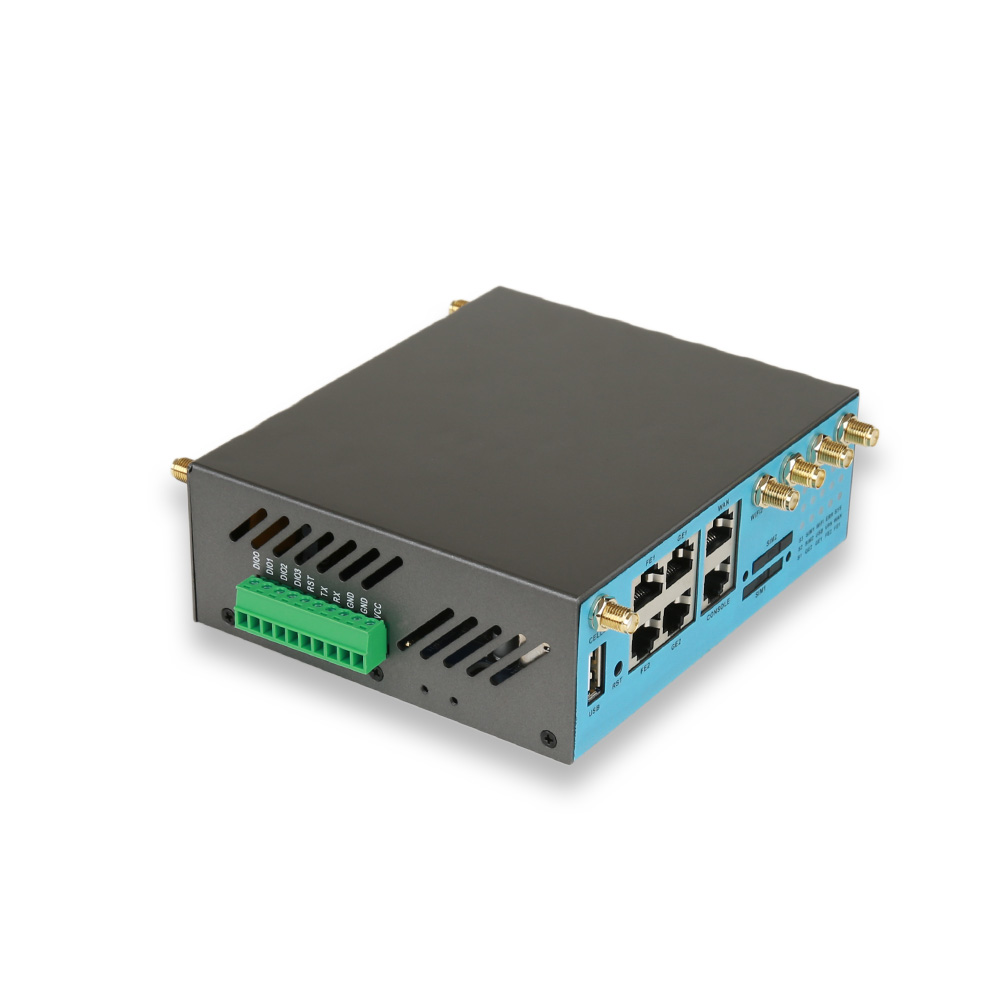
The label carries your brand, the model, the serial number, the IMEI, the MAC address, and the regulatory marks. For dual SIM units, it helps to show which slot is SIM 1 and which is SIM 2 next to the slots themselves, not only in the manual.
3. SIM access
Ask where the SIM slots sit and how they are secured. In cabinets and vehicles, slots that can be reached without removing the router from its mounting save time; in public places, slots behind a cover discourage tampering.
4. Antenna connectors
5G routers commonly use several cellular antennas for MIMO, plus GNSS and Wi-Fi connectors. Clear marking on the housing and matching labels on the supplied antennas prevent swapped connections that quietly reduce performance.
5. Power and mounting
Specify the power connector type, the input range, and the mounting method your customers use most: desktop, wall, or DIN rail. If the router will be powered over Ethernet, state whether PoE In is required.
6. First boot
The first screen the customer sees should carry your brand, your support contact, and a login that is unique to the unit rather than shared across the whole production run. Defaults for APN, failover, and management should already be in place.
7. The first support call
The customer will call you, not the factory. Your support team needs the configuration manual, the firmware release notes, and a route to the manufacturer’s engineers for problems they cannot solve.
Touchpoint
What the end customer experiences
What to specify with the OEM manufacturer
Carton
Complete kit, clear instructions
Accessory list, quick-start sheet, packaging design
Label
Your brand, clear identifiers
Label artwork, SIM slot marking, regulatory marks
SIM access
Easy, secure insertion
Slot position, cover, orientation marking
Antennas
Correct connections first time
Connector marking, antenna labelling
Power and mounting
Fits the site without adapters
Connector, input range, mounting kit
First boot
Branded interface, working defaults
Web interface branding, default settings, credentials policy
Support
Fast answers from your team
Manuals, release notes, escalation path
Defaults That Make or Break Dual SIM
The dual SIM function is only as good as its settings. Agree on them before production:
Primary SIM and return policy: which SIM carries traffic normally, and whether and when the router returns to it after a failover.
Failure detection: how the router decides a link has failed, using reachability checks rather than signal level alone.
APN per SIM: each operator may need its own APN and credentials.
Data limits and alerts: whether traffic on the backup SIM should be restricted, and how a failover is reported to your monitoring.
Management server: the address of the platform that will monitor the fleet from the first power-on.
Security Defaults
Branded routers carry your name into your customers’ networks. Avoid passwords shared by every unit, disable services that are not needed, and agree how firmware updates will be delivered. In the European Union, cybersecurity requirements for internet-connected radio equipment under the Radio Equipment Directive have applied since 1 August 2025, with the EN 18031 series as harmonised standards, and the company placing a product on the market under its own brand takes on the manufacturer’s obligations. Discuss early with the OEM manufacturer how its compliance documentation supports yours.
What E-Lins Brings to a Dual SIM 5G OEM Programme
Base models across three tiers. For full 5G, the H900f offers 5G SA/NSA, dual SIM hot backup with switchover in seconds, three Gigabit and two Fast Ethernet ports, a serial port, four DI/DO, Wi-Fi 5 or Wi-Fi 6, GPS/BeiDou and PoE In and Out. For moderate data at lower cost and power, the H900frc RedCap router offers dual SIM with Gigabit and Fast Ethernet ports, PoE In and RS232. Modem formats include the H900pfrc RedCap modem with dual SIM and 4G failover, and the H900pf and H900uf 5G modems, which list dual SIM with eSIM.
Customisation scope. E-Lins OEM and ODM services cover hardware structure, interface layout, firmware behaviour, brand presentation and enclosure design, together with labels, packaging and private-label presentation, which spans every touchpoint above.
Firmware ownership. System software is developed in-house, so defaults, branding and fixes come from the same team that maintains the code, and upgrades are free for life.
Compliance and quality. CE, FCC, and UKCA certification, RoHS compliance, and production in its own Shenzhen SMT factory under ISO 9001 and ISO 14001.
Management. TR-069, SNMP, SSH, and the E-Lins NMS cloud platform for status monitoring, parameter management, remote firmware upgrades, and statistics.
Support behind your support. 7×24 remote technical support with packet capture analysis and remote debugging, an average response time of 10 minutes during business hours and a reported 90% remote resolution rate, plus configuration manuals and video tutorials your own team can learn from.
Before the First Branded Unit Ships
Unbox a pre-production sample as if you were the customer. Install it with only the contents of the carton and the quick-start sheet. Insert both SIMs, connect every antenna, power it up, and log in. Pull the primary SIM and watch what happens. Call your own support line with a made-up problem. Every hesitation you notice is one your customers would have experienced in the field.
The Manufacturer
Shenzhen E-Lins Technology Co., Ltd. has more than 20 years of experience in wireless data communication, including ODM and OEM manufacturing for global brands, and serves customers in more than 150 countries and regions. For companies choosing a dual SIM 5G router OEM manufacturer, the specifications decide whether the product works; the out-of-the-box experience decides whether customers believe in the brand.
https://e-lins.com/
Shenzhen E-Lins Technology Co., Ltd. -
AuthorPosts

- You must be logged in to reply to this topic.
 Google hit with record EU fine over Shopping service
 Business booming for giant cargo planes